Flyers, cards and brochures in every client’s brand, ready for the printer.
Your client picks a piece and a style. The words and pictures come from their website, or from their brand kit when there is no website yet, and every style is drawn with them, so they choose between real pieces. The print file is a PDF with bleed, front and back, ready for any printer, and the print studio is there for the finer changes. In Australia, Canada and the US, they order printed copies from the piece itself.
A sample workspace. The businesses on this screen are demo data.
Nina wanted the cafés on her street to know about Saturday nights. She picked a flyer, and the words were already hers.
One client’s flyer, followed from the piece to the printed copies, on a sample workspace. Your agency sold it; the platform made it.
Harbour Ceramics is a pottery studio in Portland, Maine: classes four nights a week, and a shop of Nina Okafor’s own bowls and mugs. Your agency runs its email and its website. Nina wants a flyer for the cafés along her street, so she opens Print at your portal and picks Flyer. It comes in the sizes printers in the US use, 5.5″ × 8.5″, both sides.
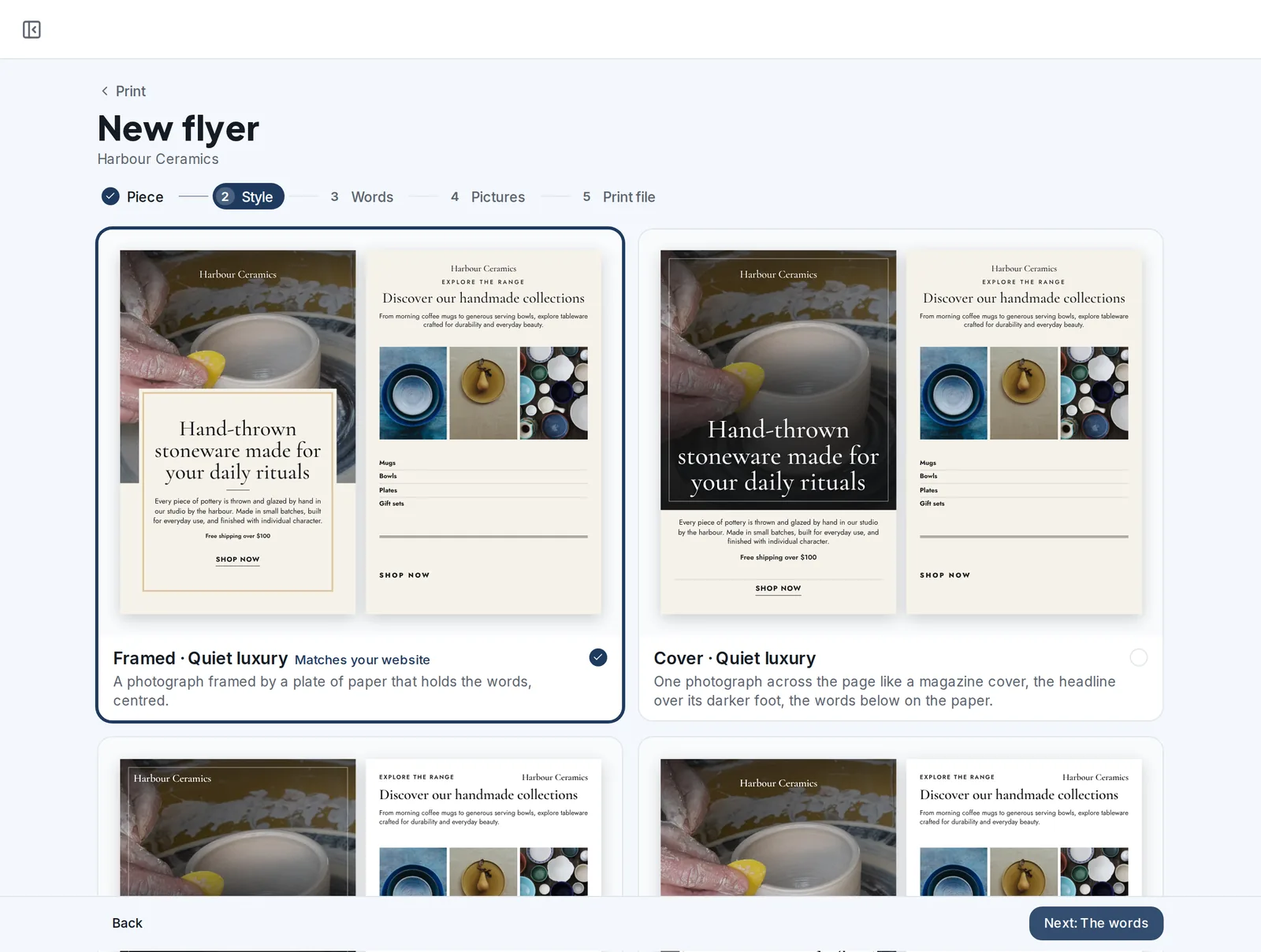
The style: drawn with her own words
Every style is drawn with her own words and pictures, not a stand-in, so she chooses between real flyers. Framed is marked as the one that matches her website. She likes Cover better for a café wall, takes it, and presses Next: The words.
The words: from her website, line by line
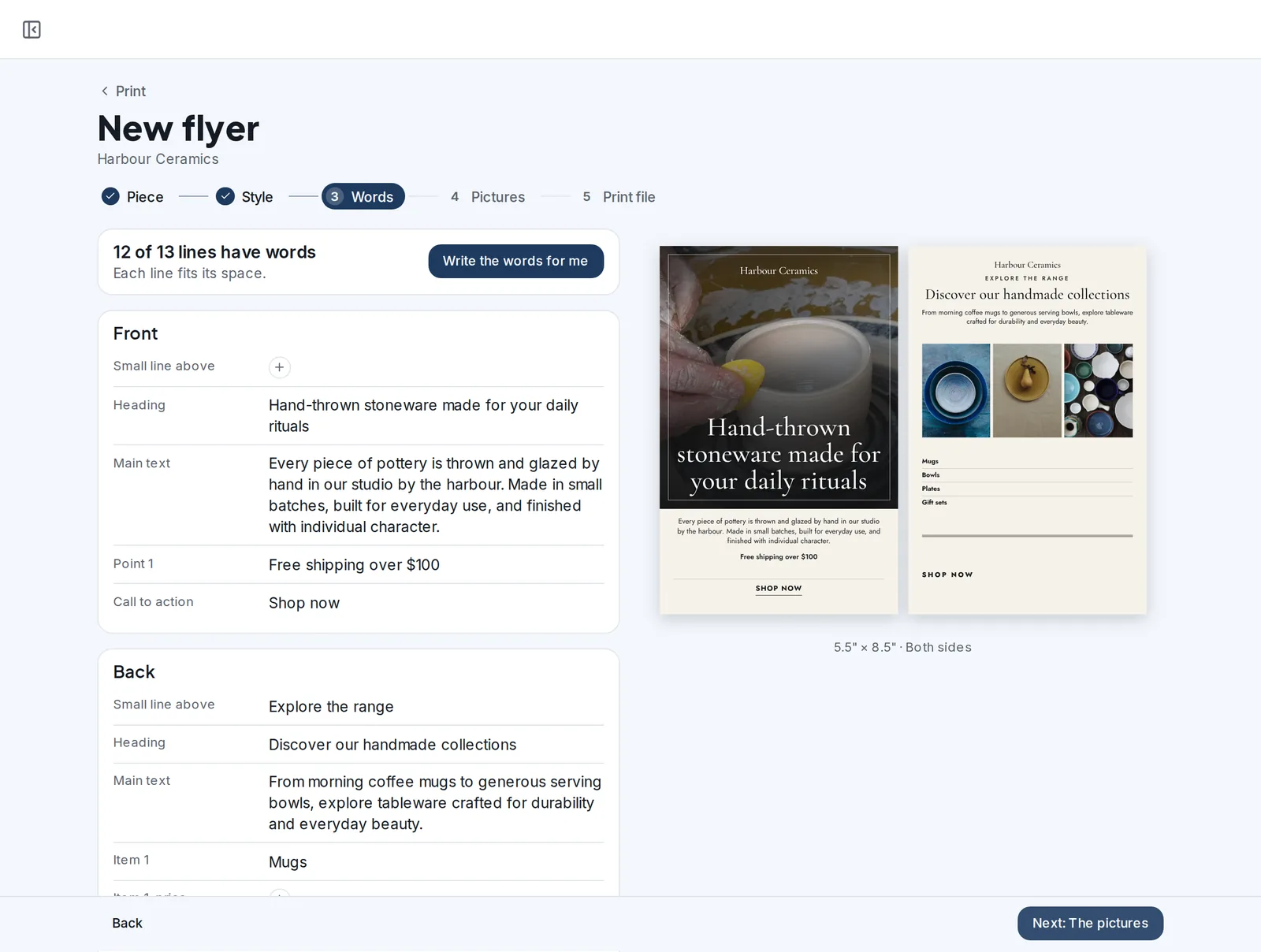
The lines are already filled from her website, section by section: the heading, the main text, the points and the call to action. The screen says 12 of 13 lines have words, and that each line fits its space. The empty one takes a tap on its +. She rewrites the heading and leaves the rest. Write the words for me would have had every line written afresh to its space, but her website already says it the way she would.
The pictures, then the print file
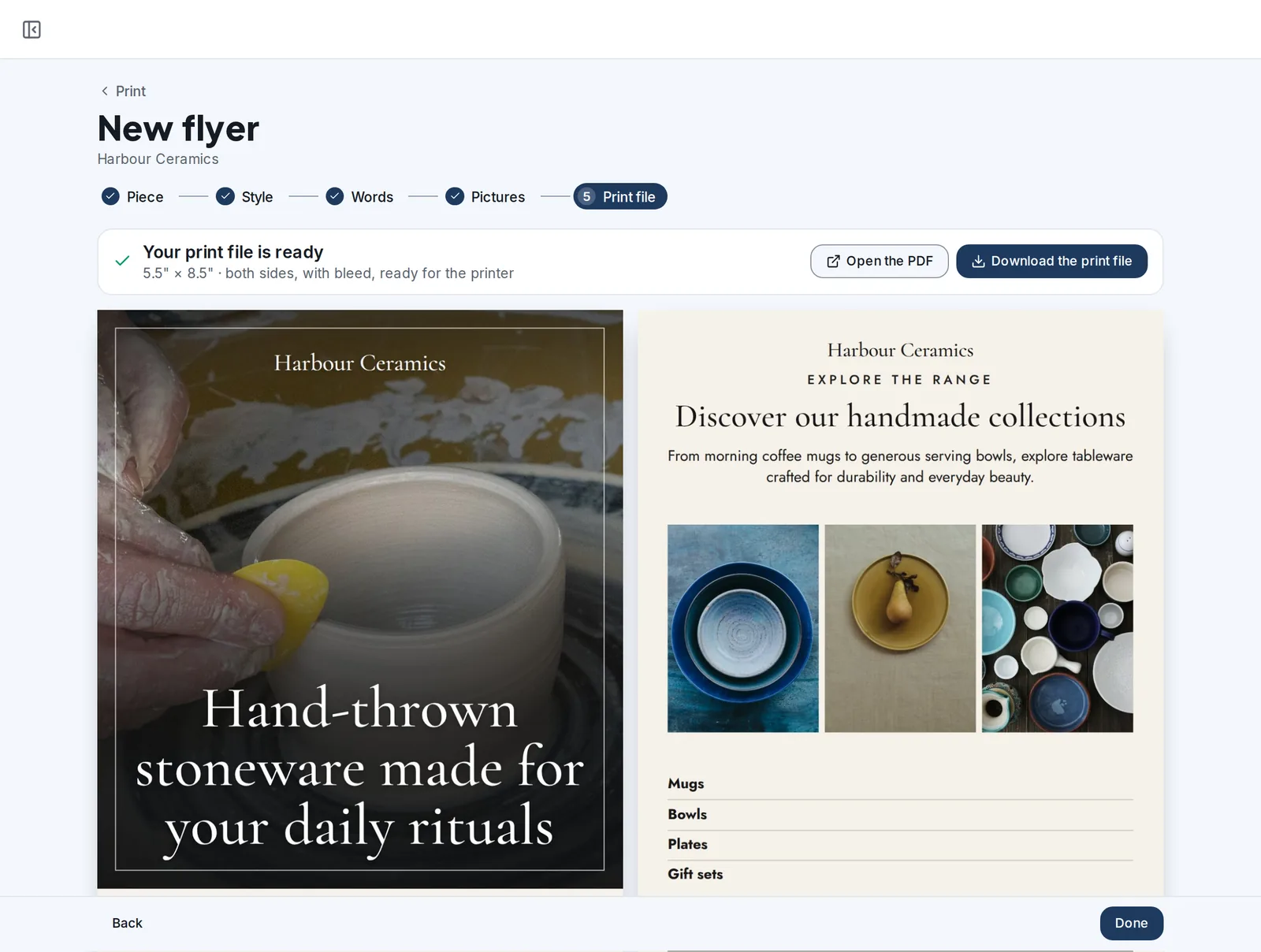
The pictures are the ones her pages show. She swaps one for a photograph of the kiln room and goes on. The print file comes back as a PDF, both sides, with bleed, ready for the printer.
A point bigger, in the print studio
Looking at it again, she wants the main text easier to read from across a café. She opens the print studio and takes the main text up a point. Pointing down the fonts shows each one on her heading before she picks it, and she sets it in Playfair Display; Change every Inter to Playfair Display does the other two boxes. She tries Change the layout, looks at the picture-led one, presses Undo, and saves. The print file is made again from what she saved.
Nina picked a flyer and a style. The words and pictures came from her own website, and the file came back ready for the printer.
250 copies, ordered from the flyer
Under the flyer, in Printed copies, she picks 250, to go to the studio. The panel shows the price with delivery in it, and the card it’s charged to, before she presses Confirm and pay. The order reads Paid, going to the print shop, then With the print shop, then Shipped, with its tracking number. When the cafés run out, she orders again from the same flyer.
That is one flyer. Every client you bring can make theirs the same way, under your name.
Five steps from the piece to the print file.
This is the screen your client uses, at your domain, under your logo.
- Five steps: the piece, its style, its words, its pictures, and the print file.
- Every style is drawn with the business’s own words and pictures.
- The style that matches their website says so.
- Back returns to any step. Nothing is printed until copies are ordered.
Every piece a business hands out, posts or pins up.
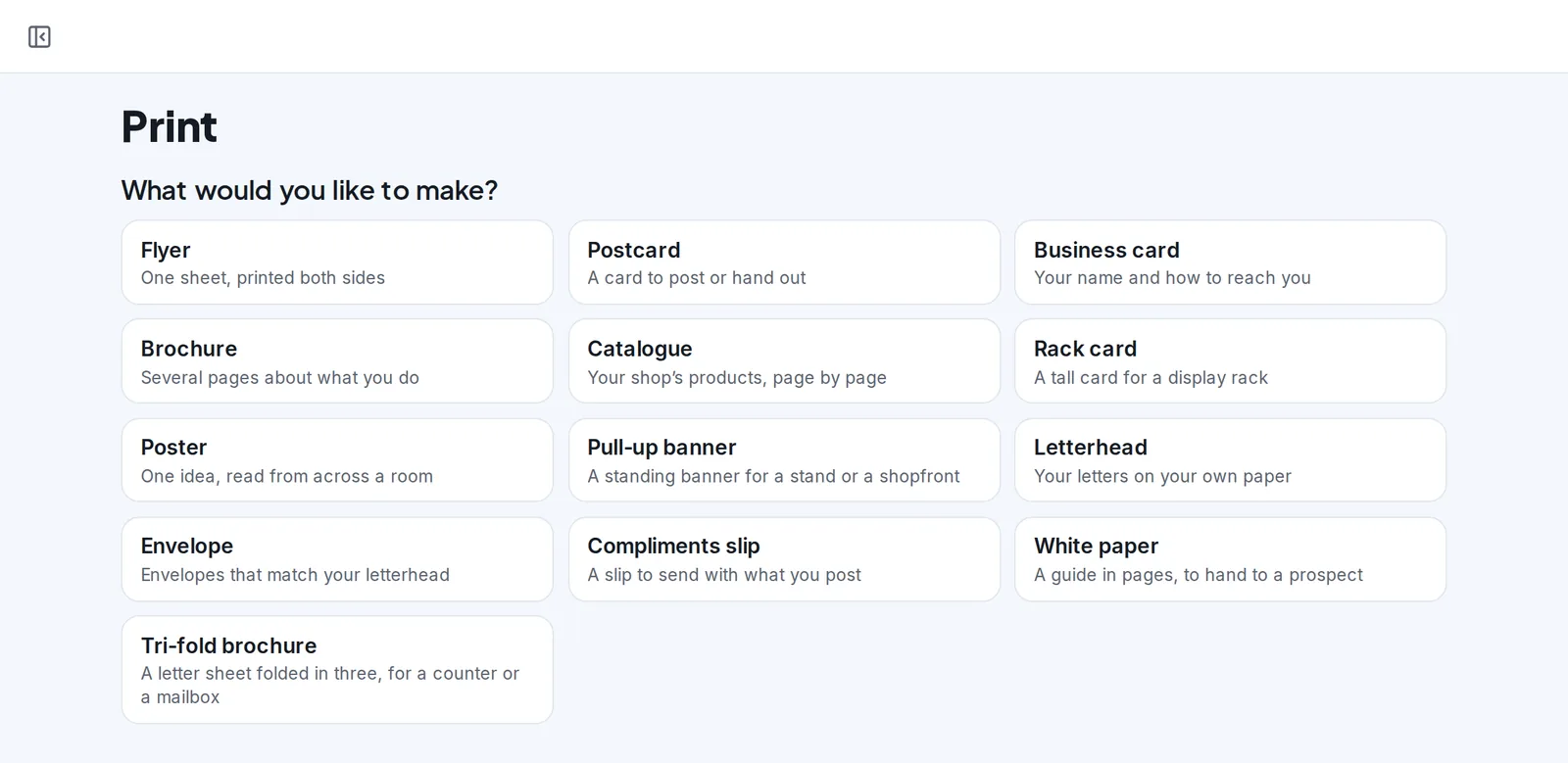
Flyers, postcards, business cards, brochures, rack cards, posters, pull-up banners, letterheads, envelopes, compliments slips and white papers, in the sizes printers use where the business is: Letter sizes in the US and Canada, A sizes in Australia. In the US there is a tri-fold brochure too.
A client with an online shop can make a catalogue, with its products as the shop lists them.
- The sizes printers use, by country
- A catalogue from the shop’s own products
- Every piece in the client’s brand
A sample workspace. The businesses on this screen are demo data.
A sample workspace. The businesses on this screen are demo data.
Written from their website, line by line, to fit the space.
Each line of the piece is filled from what the business already says on its website, section by section. Any line changes with a tap, and the screen says when every line fits its space. Write the words for me has the copywriter write every line afresh, each to its space; that writing is usage, which your clients buy at the rate you set.
The pictures are the ones their pages show. Tap one to change it, for another of their own or a stock photograph. Then the print file: a PDF, front and back, with bleed.
- Every line fits its space
- Their own pictures, or stock
- A PDF with bleed, front and back
Fonts, effects, pictures and layouts, edited the way design tools do.
The print studio edits the way design tools do. Add text, shapes, icons and pictures. Choose several at once (Shift-click, drag across the page, or ⌘A) to group them, space them evenly or copy them to another page, and turn anything by its handle. Layers restacks the page, and locks, hides or renames any part of it.
Words take any font: the ones already in the piece first, then sans serif, serif, display, handwritten and monospace, with Search fonts and a preview as they point. After a new font, Change every … to … sets it in every box that had the old one, on every page. Then bold, italic, underline, capitals, bullets, numbers, line and letter spacing, and six effects: Shadow, Lift, Outline, Hollow, Neon and Highlight.
Pictures come from their website, from stock or from their own uploads, kept in the picture library the Media studio and the email and page editors share, and one too small to print sharp is marked Prints soft. Change the layout draws every layout the page can take with its own words and pictures, and one Undo puts it back. Trim, bleed and safe area are on the page, and saving makes the print file again.
- Any font, and every box changed at once
- Their own pictures, in one library
- Every layout the page can take, drawn
Illustration · the print studio on Harbour Ceramics’ flyer: the heading in a new font, with a shadow
Copies printed wrong, damaged on the way, short or never delivered are printed again at no charge.
Illustration · a flyer’s printed copies and its orders, on a sample account
Copies ordered from the piece, and delivered by courier.
In Australia, Canada and the US, your clients order printed copies from the piece itself: how many, and where they go. Before they confirm, the panel shows the price with delivery in it, and the card it’s charged to. Each order is followed from paid, to the print shop, to shipped with its tracking number.
Copies printed wrong, damaged on the way, short or never delivered are printed again at no charge. Anywhere else, the print file goes to any printer they like.
- The price with delivery, before they confirm
- Followed to the door, with tracking
- Printed again if they arrive wrong
Your own brochure, flyer and postcard, made for you.
Print is in your Marketing hub too. Your print set, a brochure, a flyer and a postcard, is made from your brand kit and your plans, with a QR code that opens your website, and made again whenever either changes. Change the style chooses how they look.
Your print set is part of your membership, and never charged. Copies of it are ordered like any piece, and New piece makes anything else your agency hands out.
- Made from your brand kit and plans
- A QR code to your website
- Part of your membership
Illustration · a partner’s own print set, made from its brand kit
A print studio for every client, under your name.
Each line is part of Print, for every client you bring; printed copies are paid for when they’re ordered. On the right, the kind of service a business usually pays for to get the same job done.
| In SendTo | Instead of |
|---|---|
| Every piece designed in the client’s brand | A graphic designer |
| The words written to fit each space | A copywriter |
| A print file with bleed, front and back | Prepress at a print shop |
| The print studio, for the finer changes | Design software |
| Copies delivered, paid for when they’re ordered | A print broker |
| Your name and logo on every screen your client sees | A custom build |
| Every piece, in every client’s brand | Under your name |
What you might be thinking, answered straight.
“My client has their own printer.”
Then they download the print file and send it over: a PDF with bleed, front and back, ready for any printer.
“Won’t it look like a template?”
Every style is drawn with the business’s own words and pictures, so they choose between real pieces. The print studio changes any line, shape or picture.
“What if the copies come out wrong?”
Copies printed wrong, damaged on the way, short or never delivered are printed again at no charge.
“My client has no website yet.”
Print never waits for one. The lines are drafted from their brand kit, and any of them changes with a tap.
“Do my clients ever see the SendTo name?”
No. Your clients make their print at your portal, on your domain, under your logo, and every piece carries the business’s own name.
“I want to see it before I decide.”
Open the account: no card, and a sample workspace is ready when you confirm your email. You pay only when you activate.
Print, answered
What can a client make?
Flyers, postcards, business cards, brochures, rack cards, posters, pull-up banners, letterheads, envelopes, compliments slips and white papers. In the US there is a tri-fold brochure too, and a client with an online shop can make a catalogue of its products.
Where do the words come from?
From the client’s website, section by section, so a piece says what the business already says. With no website yet, they’re drafted from the brand kit. Any line changes with a tap, and Write the words for me has the copywriter write every line afresh, each to its space.
What sizes are the pieces?
The sizes printers use where the business is: Letter sizes in the US, Canada and the other countries that use them, A sizes everywhere else.
What is the print file?
A PDF of the piece, front and back, with bleed, ready for the printer. Open the PDF to look at it, or Download the print file to send it anywhere.
How do they change a piece?
In the print studio, the way design tools work: add text, shapes, icons and pictures, choose several to group or space evenly, turn anything, and restack it in Layers. Words take any font, bold, italic, capitals, bullets, line and letter spacing, and an effect. Positions are exact to a tenth of a millimetre, Edit the HTML is there for a designer, and saving makes the print file again. Change it reopens the steps instead.
Which fonts can they use?
Any font in the list: the ones already in the piece first, then sans serif, serif, display, handwritten and monospace. Search fonts finds one by name, and pointing at a font shows it on the words before it’s chosen. After a new font, Change every … to … sets it in every box that had the old one, on every page.
Can they use their own pictures?
Yes. Upload one, or drop it on the window or the page; dropped on a picture, it replaces it. Uploads are kept in their picture library, the same one the Media studio and the email and page editors use, beside the pictures from their website and stock. A picture too small to print sharp is marked Prints soft. HEIC, TIFF, PSD and SVG files are saved as JPEG or PNG first.
Can a page be laid out another way?
Yes. With nothing chosen, Change the layout draws every layout the page can take, with its own words and pictures, and says what each leaves out. Choosing one is a single step, and one Undo puts the page back. It works on the front and back of a sheet, each panel of a tri-fold, a catalogue’s cover and section openers, and any page of a piece from the library.
Who delivers the copies?
A courier, in Australia, Canada and the US. Before they confirm, the panel shows the price with delivery in it, and the card it’s charged to.
How do they follow an order?
Every order of a piece is listed under it: Paid, going to the print shop; With the print shop; then Shipped, with its tracking number. While a card’s payment is still clearing it says Payment being confirmed, and pressing again never charges twice.
Who pays for a client we manage?
For a client your team manages, the panel says Your account manager pays for these copies. A client who runs their own account pays with their own card.
What if copies arrive wrong?
Copies printed wrong, damaged on the way, short or never delivered are printed again at no charge. Something wrong with these copies?, under the order, asks for it.
Is there print for my own agency?
Yes. Your print set, a brochure, a flyer and a postcard, is made from your brand kit and your plans, with a QR code to your website. It’s part of your membership and never charged.
Do my clients ever see the SendTo name?
No. Your clients make their print at your portal, on your domain, under your logo, and every piece carries the business’s own name.
Do I need a card to try it?
No. Create your account and a sample workspace is ready when you confirm your email. Sending switches on when you activate.
Print, and everything else in the hub, on one platform under your name.
Every client you bring can hand out flyers, cards and brochures in their own brand: written from their website, ready for any printer, and delivered in Australia, Canada and the US. Open your account free and look around a sample workspace.
No contract · Cancel any time · Explore everything before you pay