Change any landing page, section by section, for every client, with no designer and no developer.
Landing Page Studio opens the page inside the campaign it belongs to. Rewrite it with AI from a line about what should change, in the tone and style you choose, or edit any section yourself. It tells you when a link goes nowhere, shows what is live and what its form has taken, and keeps a second version beside the first. There is no cap on pages, and your clients see your name on it, never ours.
Harbour & Co. extended their offer by a month. The page was right again before lunch.
One page, one change of plan, and the two versions that came out of it, on a sample workspace.
Your client is Harbour & Co., a cleaning company. Their spring page has been live for three weeks: 20% off a full deep clean, book before 31 October, and a button that says “Get your quote”. Bookings are good, so on a Friday morning the owner calls: keep the offer going to the end of November.
One line about what should change
You open the campaign, and the page is at step 2, where it was made. You press Write with AI. Under “What should change?” you type: “New end date: book before 30 November. Keep everything else.” Tone stays Professional; style stays Modern & Clean. Rewrite.
The page is written again, and the headline and the closing line now say 30 November.
Any section, by hand
One thing no one told the AI: the team now cleans on Sundays. You click into the section about booking and add the line yourself, then drag a Text block in beneath it from Blocks for the Sunday hours.
Nothing goes nowhere
The studio flags one thing: “1 link goes nowhere”, and Publish says so too: Can’t publish yet. Its list says why: No page there. An old button pointed to a winter price list that no longer exists. You point it at the page’s own quote form instead, and the page can go live again.
A second version, to see what works
While you are there, you press New version: a second take on the same offer, written beside the first. Now there are two, A and B, and visitors see one or the other. By Wednesday the numbers show which one brings more quote requests.
The owner rang with a change of plan. The page carried it, and a second version, before lunch.
Live, with what it has taken
The page shows Live, and beside it what its form has taken: “Form · 1 new”. Every entry is kept, and arrives in the inbox as a conversation.
That is one page for one client. Every client can change their pages the same way, and there is no cap on how many.
Two films: how a page is written and changed, and where it lives.
Each is the real platform, on a sample workspace.
One page, open in its campaign: what it says, where it links, and what it has taken.
This is the screen your client uses, at your domain, under your logo.
- Step 2 of 9: the page is made in the campaign, before the emails, so every link has somewhere to go.
- Landing page, or your website: where the campaign’s links take people.
- It tells you when a link on the page goes nowhere, before anyone clicks it.
- Live, and what its form has taken: one new entry.
- Write with AI: say what should change, choose the tone and style, and the page is rewritten.
- Blocks to drag onto the page: sections, columns, a form, headings, text, images and buttons.
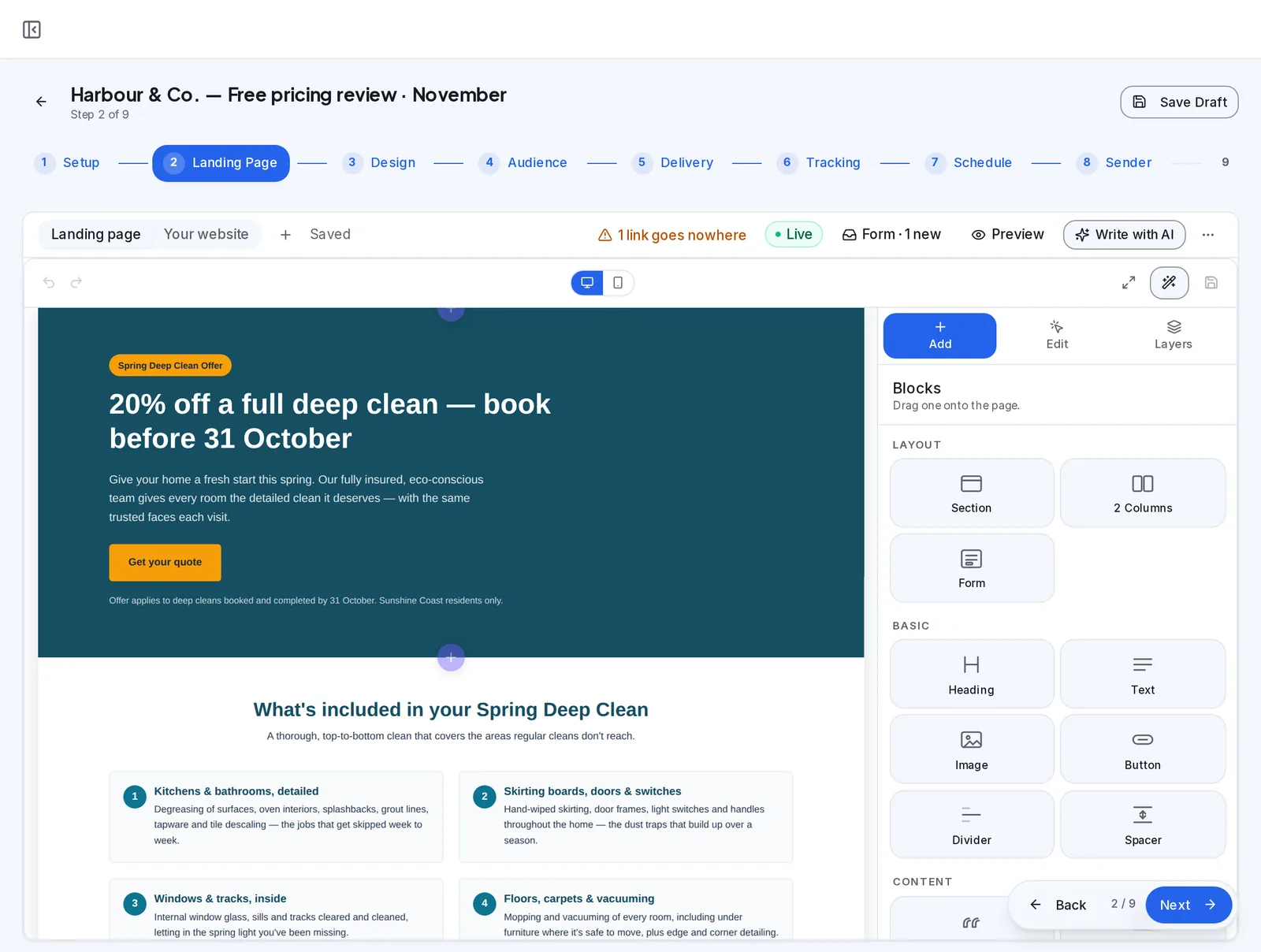
A sample workspace. The businesses on this screen are demo data.
Written in a minute, then changed section by section.
Press Write with AI, say in a sentence what the page is for, and it is laid out section by section, with a headline and a form. Change any section, or have it written again.
Choose New version with AI for a different take on the same offer. Visitors see A or B, and the numbers show you which one works.
- A whole page from one sentence
- Any section changed by hand
- A and B, side by side
Served on every sending domain the campaign uses.
Each email’s link points to the domain it came from, and the page is served right there, so the reader lands somewhere real.
One click takes them on to the website or wherever you choose, and you see every step: sent, opened, clicked and landed.
- On every sending domain
- One clear way on
- Every step counted
Illustration · a pricing section added from the library, ready to be written for the business
Any section from the library, written for the business in one press.
Add a section opens the library, searched by name. A new section arrives with sample words marked and sample photographs in grey, and Write it for the business writes that section alone: words you typed are kept, and empty frames get stock photographs. One Undo takes it all back.
A Video section plays one of your Media studio films, or a YouTube or Vimeo link. And a campaign can use a page you already made: Choose a page, on its Landing step, lists each one with how many campaigns use it.
- Searched by name
- One section written at a time
- One Undo takes it back
A page builder your clients would otherwise pay six places for, unlimited, under your name.
Each line is on every licence, for every client you bring. On the right, the kind of tool a business usually pays for to get the same job done.
| In SendTo | Instead of |
|---|---|
| Unlimited landing pages, changed section by section | Unbounce or Instapage |
| Rewritten with AI from a line about what should change | A copywriter on retainer |
| The tone and style chosen each time it is written | A designer |
| A link that goes nowhere, flagged before anyone clicks it | A QA checklist |
| A second version beside the first, A and B | An A/B testing tool |
| Your name and logo on every screen your client sees | A custom build |
| Unlimited pages, for every client | One licence |
What you might be thinking, answered straight.
“My clients will break the page.”
Each change is to one section, and the studio flags a link that goes nowhere before anyone clicks it. A second version can be tried beside the first instead of replacing it.
“Every change will mean a call to me.”
Only if you sell it that way. A client can say what should change in a line and have the page rewritten, or change a section themselves, at your portal.
“Do I need a developer to publish it?”
No. The page is made in the campaign and served on its sending domains, so there is nothing to upload and nothing to host.
“Which tone and style should I pick?”
The ones that fit the business, from Professional to Playful & Fun, and from Modern & Clean to Editorial. You choose again each time the page is written.
“Is there a catch in “unlimited”?”
No cap on pages, for any client. Landing pages come with the plans you choose to include them in, and rewriting with AI is usage, which your clients buy at the rate you set. Changing a section by hand is not.
“I want to see it before I decide.”
Open the account: no card, and a sample workspace is ready when you confirm your email. Write a page from one sentence, then change a section yourself.
Landing Page Studio, answered
What is Landing Page Studio?
Where a landing page is written, changed and published: section by section, with Write with AI and the blocks beside it.
Where do I find it?
In the campaign, at step 2, before the emails are designed, and under Landing pages in the menu.
How do I start a page?
Build from my offer starts it from the offer in the campaign’s setup. Write has it written with AI from a sentence. Start blank gives you an empty page.
How do I change a page with AI?
Press Write with AI, say what should change, choose the tone and style, and press Rewrite. Or press New version for a second take beside the first.
Which tones and styles can I choose?
Tones such as Professional, Casual & Friendly, Luxury & Premium, Playful & Fun, Empathetic & Warm and Authoritative. Styles such as Modern & Clean, Bold & Colorful, Minimalist, Editorial, E-commerce and Newsletter.
Can I change it myself?
Yes. Change any section by hand, and drag blocks onto the page from Blocks: sections, columns, a form, headings, text, images, buttons, dividers and spacers.
How do I know every link works?
The studio counts the links that go nowhere, such as “1 link goes nowhere”, and its list says why each one goes nowhere, with a box for where it should go. A page with one can’t go live: Publish, a campaign’s send and a funnel all wait until each has an address.
Can I add a section from a library?
Yes. Add a section opens the library, and Write it for the business writes that one section, keeping any words you typed. One Undo takes it back.
Can a campaign use a page I already made?
Yes. On the campaign’s Landing step, Choose a page lists your pages, each with how many campaigns use it. A page with versions shows A or B at random.
What happens when I pause a version?
New visitors from the campaign go to the page’s other versions. Mail already queued keeps its page.
Can the campaign link to the website instead?
Yes. Choose Landing page or Your website for where the campaign’s links take people.
Do my clients ever see the SendTo name?
No. Your clients change their pages at your portal, on your domain, under your logo.
Do I need a card to try it?
No. Create your account and a sample workspace is ready when you confirm your email. Sending switches on when you activate.
Landing Page Studio, and everything else in the hub, unlimited. From $997 a month.
A page that was right last month can be wrong today. Landing Page Studio lets every client change theirs in minutes, section by section, under your name, with no cap on how many. Open your account free and write a page from one sentence.
No contract · Cancel any time · Explore everything before you pay